Most Bengaluru professionals use LinkedIn the same way – post occasionally, apply to jobs, wait. But the professionals who consistently get more calls, more recruiter InMails, and more opportunities from LinkedIn in Bengaluru are doing something different. They are using LinkedIn analytics job search Bengaluru strategies – reading the data their profile generates every single week and making specific, targeted improvements based on what the numbers actually show.
LinkedIn gives every user a free analytics dashboard packed with real data: who is viewing your profile, how recruiters are finding you in search, which posts are reaching the right audience, and how your visibility is trending over time. Most Bengaluru professionals have never opened this dashboard deliberately. They are leaving one of the most powerful free LinkedIn data insights tools completely untouched.
This guide changes that. Whether you are a software engineer in Whitefield, a product manager in Koramangala, a UX designer in Indiranagar, or a finance professional in CBD Bengaluru – this complete guide to LinkedIn analytics job search Bengaluru will show you exactly what the numbers mean, how to read them correctly, and how to turn data signals into specific actions that get you hired faster.
Let us start with the dashboard itself.
What Is the LinkedIn Analytics Dashboard and Where Do You Find It?
The LinkedIn dashboard is LinkedIn’s built-in analytics centre that tracks how your profile, posts, and activity are performing. It is available to every LinkedIn user – free and Premium alike – and it updates in real time as people interact with your profile and content.
Here is exactly where to find it:
- Log into LinkedIn on desktop (analytics are limited on mobile)
- Go to your LinkedIn profile page
- Scroll down past your About and Experience sections
- Look for the ‘Analytics’ section – it shows summary cards for Profile Views, Search Appearances, and Post Impressions
- Click ‘Show all analytics’ to open the full LinkedIn dashboard with complete data
The full LinkedIn dashboard has three main sections: Profile Analytics, Content Analytics, and Creator Analytics. For LinkedIn analytics job search Bengaluru purposes, Profile Analytics is the most important starting point – this is where you will find the data that tells you exactly how visible you are to Bengaluru’s recruiters and hiring managers.
| LinkedIn Dashboard Section | What It Shows | Why It Matters for Bengaluru Job Search |
| Profile Views | How many people viewed your profile in last 90 days | Tracks whether your profile is attracting recruiter attention |
| Search Appearances | How many times you appeared in LinkedIn searches this week | Shows how findable you are to Bengaluru recruiters |
| Post Impressions | How many times your posts were seen by others | Measures whether your content is reaching your target audience |
| Follower Analytics | Who is following your content and where they are from | Shows if you are building audience in the right Bengaluru sectors |
| Article Views | Views on longer-form LinkedIn articles you have published | Measures thought leadership content performance |
Did You Know? LinkedIn’s analytics dashboard updates daily – which means Bengaluru professionals who check it weekly can spot changes in their profile visibility almost as soon as they happen. A sudden spike in profile views after a profile update or a post is a real-time signal that something is working. A drop after a period of inactivity is a signal to take action. LinkedIn analytics job search Bengaluru professionals who read these signals consistently make faster, smarter career decisions.
Also Read – LinkedIn Networking Strategy for Freshers in Bengaluru [2026 Complete Guide]
What Do LinkedIn Analytics Tell You – And What Do They Not Tell You?
Before diving into how to use LinkedIn data insights for your Bengaluru job search, it is important to understand exactly what these analytics reveal – and where their limitations are. Many Bengaluru professionals either over-interpret or completely ignore their analytics. Neither extreme helps.
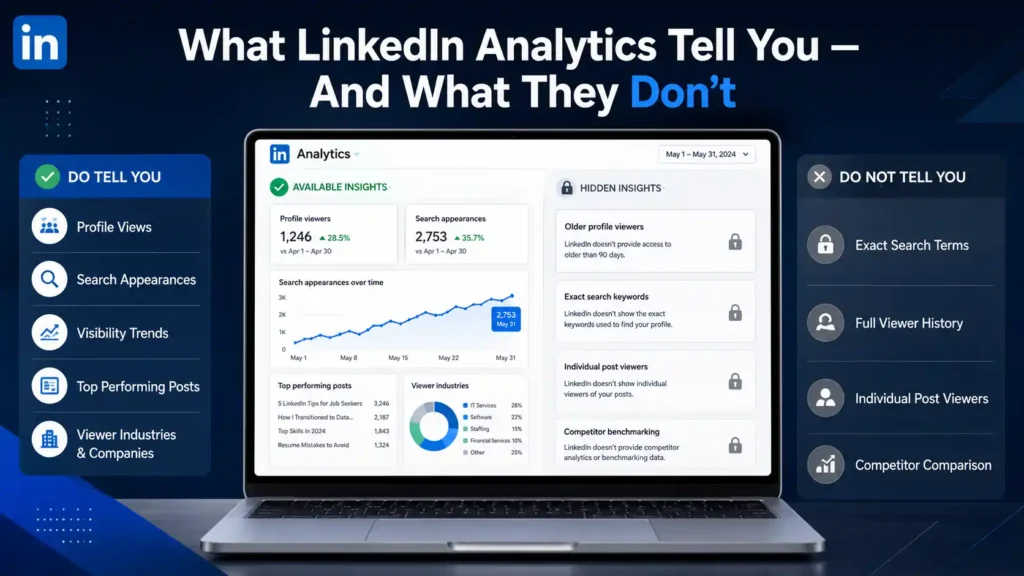
What LinkedIn Analytics DO Tell You
- Who viewed your profile (limited detail on free) – LinkedIn shows the last 5 profile viewers for free accounts and the last 90 days for Premium. Even the free version shows viewer industries, job titles, and companies – which is enough to identify patterns
- How many times you appeared in search results – the LinkedIn search appearances metric shows you how many LinkedIn searches your profile appeared in during the past week, along with what keywords those searchers used and what companies they work at
- Whether your profile visibility is trending up or down – comparing week-over-week data shows you whether a profile update, a new post, or increased activity improved your visibility or had no effect
- Which of your posts performed best – post analytics show impressions, reactions, comments, and shares – letting you identify which content types and topics resonate most with your Bengaluru network
- What industries and companies your profile viewers come from – this is one of the most actionable LinkedIn data insights available, especially for targeting specific Bengaluru companies
What LinkedIn Analytics Do NOT Tell You (Free Version)
- Exactly who viewed your profile more than 5 viewers ago – this requires LinkedIn Premium
- The specific search terms people used to find your profile – you see categories but not exact keywords on free accounts
- Individual post viewer details – you can see total impressions but not who specifically saw each post
- Competitor benchmarking – LinkedIn does not show how your profile performance compares to similar professionals in Bengaluru
Understanding these limitations helps you use what you do have more effectively. For most LinkedIn analytics job search Bengaluru strategies, the free analytics data is more than sufficient – the key is knowing how to interpret and act on the data you can already see.
How to Use LinkedIn Profile Views Analytics for Your Bengaluru Job Search
The profile views analytics section of your LinkedIn dashboard is the most direct signal of recruiter and hiring manager interest. Here is how Bengaluru professionals should read and act on this data:
What Is a Good Number of Profile Views?
This varies by seniority, industry, and activity level – but here are realistic benchmarks for LinkedIn analytics job search Bengaluru professionals:
| Profile Activity Level | Weekly Profile Views (Bengaluru Average) | What It Means |
| Inactive profile, no posts | 2 to 5 views per week | Very low visibility – profile needs optimisation |
| Complete profile, occasional activity | 10 to 25 views per week | Moderate visibility – room to grow |
| Active posting, complete profile | 30 to 80 views per week | Good visibility – attracting consistent attention |
| Consistent posting + Open to Work | 80 to 200+ views per week | High visibility – in the recruiter radar regularly |
| Viral post or featured in newsletter | 500 to 2000+ views in one week | Spike event – capitalise immediately with follow-ups |
How to Read Profile Viewer Data for Bengaluru Job Search
Even on a free account, the profile views analytics section tells you the industry, job title, and company of recent viewers. Here is how to use this information actively:
- Tech company viewer from Bengaluru – if an engineering manager or HR professional from a Bengaluru tech company views your profile, visit their profile, connect with a personalised note, and if you are interested in the company – apply to relevant open roles within 48 hours while your name is fresh
- Recruiter from a staffing firm – if a Bengaluru-based recruiter views your profile, send a connection request immediately with a short note about your current goals. They viewed you for a reason – make it easy for them to reach out
- Profiles from your target companies – track whether companies you are actively applying to are viewing your profile. If a company’s HR team views your profile after you applied, that is a positive signal – follow up on your application within 24 hours
- No relevant viewers despite active applications – if your profile views analytics show no views from relevant companies or recruiters, the problem is profile discoverability, not your qualifications. This signals a headline or skills section optimisation issue
Did You Know? Bengaluru’s tech ecosystem is one of India’s most active on LinkedIn, with over 2 million tech professionals on the platform in the city. LinkedIn’s own data shows that profile views in Bengaluru spike on Tuesday and Wednesday mornings – making Monday night and Tuesday morning the best times to post content or update your profile for maximum recruiter visibility during the working week.
Also Read – LinkedIn Premium vs Free: Is It Worth It for Job Seekers in Bengaluru?
What Does LinkedIn Search Appearance Mean – And Why It Is the Most Important Metric for Bengaluru Job Seekers
The LinkedIn search appearances metric is the single most important number in your LinkedIn dashboard for job search purposes – yet it is the most misunderstood by Bengaluru professionals. Here is a complete explanation of LinkedIn search appearances meaning for Bengaluru job seekers:
Your LinkedIn search appearances number tells you how many times your profile appeared in LinkedIn search results during the past 7 days. This is not how many times someone clicked on your profile – it is how many times you showed up in the list of results when someone searched LinkedIn.
Why does this matter so much? Because LinkedIn search is how recruiters find candidates. When a Bengaluru recruiter opens LinkedIn Recruiter and types ‘Python developer Bengaluru 4 years experience’ or ‘Product Manager B2B SaaS Koramangala’ – your search appearance count directly reflects how often your profile is showing up in those searches.
How to Read Your Search Appearances Data
The search appearances section of your LinkedIn dashboard shows three things:
- Total search appearances this week – the headline number. Anything above 20 to 30 for an actively searching Bengaluru professional is a reasonable baseline
- Keywords used in searches that found you – LinkedIn shows the top keyword categories that led to your profile appearing in results. This is extremely valuable LinkedIn data insights – it tells you exactly what recruiters are searching for when they find (or do not find) you
- Companies whose employees searched for you – LinkedIn shows which companies the people who found you work at. If your top companies are in Bengaluru’s IT sector, that confirms your profile is reaching the right audience
How to Increase Your LinkedIn Search Appearances in Bengaluru
Low search appearances is the most common and most fixable problem in LinkedIn analytics job search Bengaluru optimisation. Here are the specific actions that directly increase this number:
- Add exact-match keywords from Bengaluru job descriptions – go to LinkedIn Jobs, search for your target role in Bengaluru, open 5 to 10 job descriptions, and identify the skills and keywords that appear most frequently. Add these exact terms to your headline, About section, and skills list
- Use specific skill terms, not general ones – ‘React.js developer’ appears in more recruiter searches than ‘front-end developer’. ‘Growth hacking’ appears in more Bengaluru startup searches than ‘marketing’. Specificity drives LinkedIn search appearances
- Post content regularly – LinkedIn’s algorithm gives active profiles higher search ranking. Posting even twice a week increases your LinkedIn search appearances measurably within 2 to 3 weeks
- Get endorsements for target skills – endorsed skills carry more weight in LinkedIn’s search algorithm than self-added skills. Ask 3 to 5 connections to endorse your top 5 skills – this directly boosts your search ranking for those terms in Bengaluru
- Complete your profile to 100 percent – LinkedIn’s algorithm deprioritises incomplete profiles in search results. Every empty section is a search ranking penalty
How to Track LinkedIn Job Search Performance in India – A Data-Driven Weekly Routine
Knowing how to track LinkedIn job search performance India-style means building a consistent data review habit – not just checking your analytics occasionally when you remember. Here is the exact weekly routine Bengaluru professionals should follow:
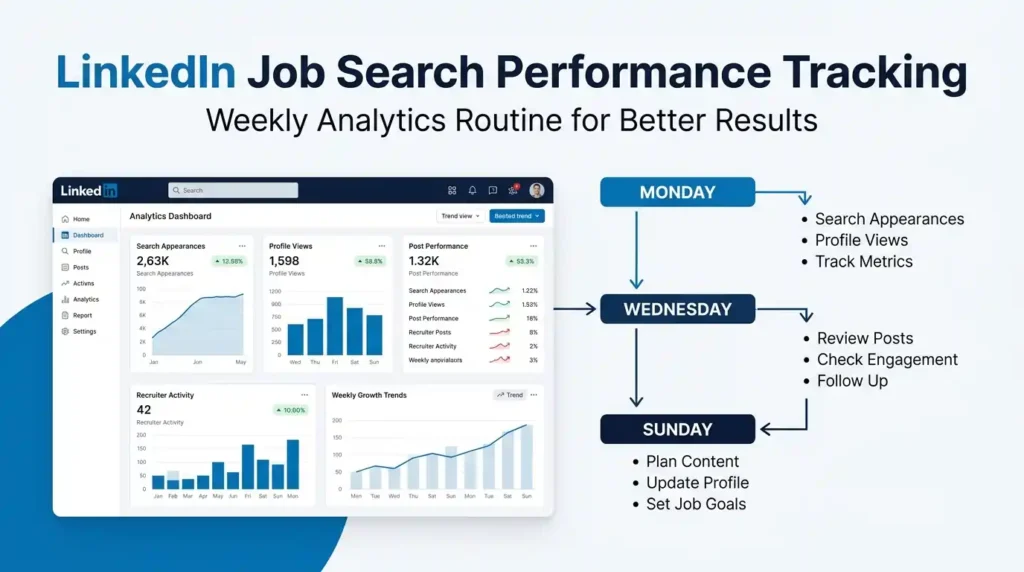
Every Monday Morning – 15 Minutes
- Check Search Appearances – compare this week’s number to last week. Up or down? If down by more than 20 percent, look for what changed – did you reduce posting frequency? Did you remove any keywords from your profile?
- Check Profile Views – are the same companies viewing you, or new ones? Did any target Bengaluru companies or recruiters appear?
- Log both numbers in a simple tracking sheet – a basic Google Sheet with Date, Search Appearances, Profile Views, and Notes is enough. This gives you a trend line over 4 to 6 weeks that makes patterns visible
Every Wednesday – 10 Minutes
- Check which posts are performing – which of your recent posts got the most impressions and engagement? Note the topic, format, and time posted
- Follow up on profile viewers – if new relevant companies or recruiters viewed your profile this week, connect with them today while it is still timely
Every Sunday – 20 Minutes
- Plan next week’s content based on analytics – if your best-performing post this week was about a specific tech topic or career lesson, plan two more posts on related themes for next week
- Update your profile based on search appearance keywords – if the search appearances section shows recruiters finding you through keywords you had not prioritised, add those terms more prominently to your headline or About section
- Set application goals for the week – based on which Bengaluru companies viewed your profile this week, set a goal to apply to or connect with someone at those specific companies in the coming week
| Weekly Analytics Action | Time Required | What It Tells You | What to Do With the Data |
| Check Search Appearances | 3 minutes | How findable you are to Bengaluru recruiters | Optimise keywords if number is low or falling |
| Review Profile Viewers | 5 minutes | Which companies and roles are noticing you | Connect with relevant viewers within 48 hours |
| Analyse Post Performance | 5 minutes | Which content resonates with your audience | Double down on formats and topics that perform |
| Log Data in Tracker | 2 minutes | Visible trend line over 4 to 8 weeks | Identify patterns and time your profile updates |
| Plan next week | 10 minutes | What actions will improve next week’s numbers | Write posts, update keywords, target specific companies |
Also Read – How to Leverage LinkedIn Events for Job Networking in Bengaluru
LinkedIn Analytics Tips for Improving Profile Visibility in Bengaluru – What Actually Moves the Numbers
Here are the specific LinkedIn analytics tips for improving profile visibility Bengaluru that directly impact your key metrics – not generic advice, but actions with measurable effects on your LinkedIn dashboard data:
Tip 1: The Headline Rewrite Test
Your LinkedIn headline is the single biggest driver of LinkedIn search appearances for Bengaluru job seekers. Here is how to test its effectiveness using analytics:
- Note your current search appearances number
- Rewrite your headline to include 2 to 3 specific keywords from Bengaluru job descriptions in your target role
- Check search appearances again after 7 days – if the number has increased by 20 percent or more, the new headline is working
- If it has not moved, try different keywords or add your target city name (Bengaluru, Bangalore) explicitly to your headline
Tip 2: The Content Timing Experiment
LinkedIn’s algorithm distributes content based on initial engagement velocity. For Bengaluru professionals, here is how to use post analytics to find your optimal posting time:
- Post 4 times over 2 weeks – twice at 8 to 9 AM on weekdays and twice at 12 to 1 PM on weekdays
- Check the impressions and engagement on each post after 48 hours
- The time slot with consistently higher impressions is your optimal posting window for reaching Bengaluru’s professional audience
- Most Bengaluru tech professionals are most active on LinkedIn between 8 and 10 AM and during lunch breaks – but your specific audience may differ, and your own analytics will tell you
Tip 3: The Skills Section Audit
The LinkedIn search appearances section shows you keywords that led to your profile appearing in results. Use this data to audit your skills section:
- If recruiters are finding you through keywords that are not in your top 10 skills – add those keywords to your skills list
- If you are appearing in searches for roles you are not targeting – replace those keywords with more relevant ones
- After updating your skills, wait one week and recheck your search appearances to see if the keyword composition has shifted toward your target roles
Tip 4: The Profile Update Visibility Spike
LinkedIn notifies your connections when you update your profile – and this creates a short-term spike in profile views analytics. Strategic Bengaluru professionals use this deliberately:
- Make a meaningful profile update – new experience entry, updated headline, new certification added – once every 3 to 4 weeks
- Time the update for a Tuesday or Wednesday morning when Bengaluru professionals are most active on LinkedIn
- Check your profile views in the 48 hours after the update – there should be a noticeable spike
- Use this spike window to also send connection requests and apply to roles – your profile is at peak visibility during this period
Did You Know? LinkedIn’s algorithm gives a temporary visibility boost to profiles that have been recently updated – showing them higher in search results for up to 72 hours after the update. For Bengaluru job seekers using LinkedIn analytics job search Bengaluru strategies, this means timing your profile updates to coincide with your most active application periods creates a compounding visibility effect that no bot or automation tool can replicate.
How to Use LinkedIn Data Insights to Find Jobs Faster in Bengaluru
The deepest level of LinkedIn analytics job search Bengaluru strategy is using your data not just to improve your profile – but to actively identify and pursue job opportunities faster. Here is how to turn LinkedIn data insights into a proactive opportunity pipeline:
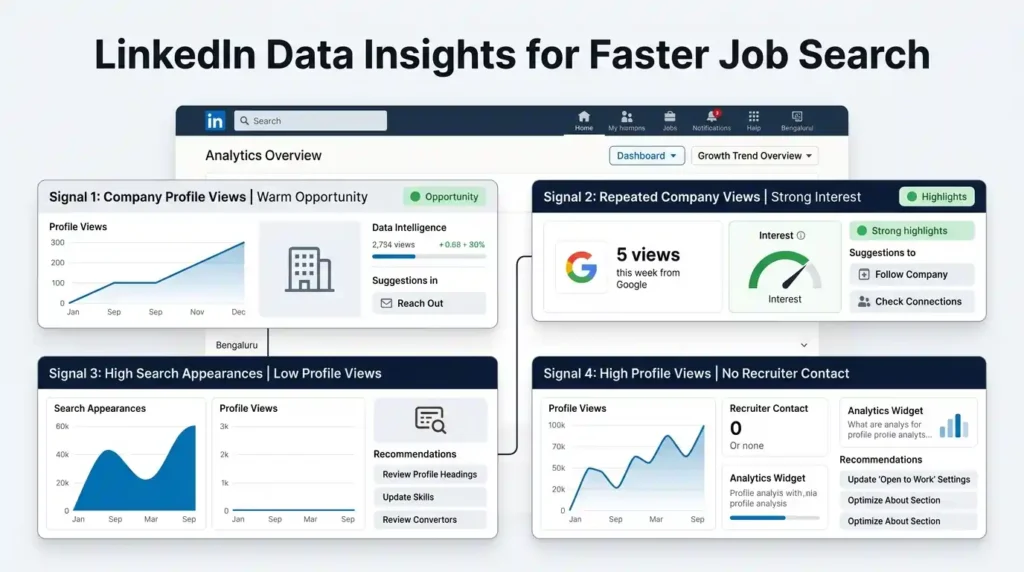
Signal 1: Company Profile Views = Warm Opportunity
When an employee or HR professional from a specific Bengaluru company views your profile, that company has just self-identified as having potential interest in your background. Here is the action sequence:
- Go to that company’s LinkedIn page immediately – check their current job openings
- If a relevant role is open, apply within 24 to 48 hours – while your name is still fresh in their system
- Find the specific person who viewed your profile (if visible) and send a connection request with a brief, specific note
- If no relevant role is currently open, follow the company and set a job alert – their next posting may be for exactly what you are looking for
Signal 2: Repeated Views From the Same Company = Strong Interest
If you notice that multiple people from the same Bengaluru company have viewed your profile in the same week, this is a strong LinkedIn data insights signal. It often means a hiring discussion is happening internally and your profile has been shared among the team. Treat this like an inbound lead:
- Apply to any open roles at this company immediately
- Connect with the recruiter or hiring manager at the company
- Post content that is specifically relevant to that company’s industry or tech stack in the next few days – this keeps your name visible to their employees
Signal 3: High Search Appearances, Low Profile Views = Headline Problem
If your LinkedIn search appearances are high but your profile views analytics are low – many recruiters are seeing your name in search results but not clicking to view your profile. This is a clear Bengaluru job strategy signal: your headline or profile photo is not compelling enough to earn the click. Fix:
- Rewrite your headline to be more specific and benefit-focused
- Ensure your profile photo is professional and high quality
- Check whether your current job title in the headline matches what Bengaluru recruiters are searching for
Signal 4: High Profile Views, No Recruiter Contact = Profile Content Problem
If recruiters are clicking your profile but not reaching out or moving forward – the problem is in your profile content, not your discoverability. Check your:
- About section – is it compelling, specific, and achievement-focused?
- Experience entries – do they show specific outcomes and numbers, or just duties?
- Skills and recommendations – are they current, relevant, and endorsed?
- Featured section – is there anything that demonstrates your work quality?
Also Read – Best LinkedIn Groups to Join for Job Opportunities in Bengaluru (2026 Guide)
What LinkedIn Analytics Data Looks Like for Bengaluru Professionals Across Different Sectors
Different sectors in Bengaluru show very different LinkedIn analytics job search Bengaluru patterns. Understanding what normal looks like for your specific sector helps you benchmark your performance accurately:
| Bengaluru Sector | Typical Weekly Search Appearances | Typical Weekly Profile Views | Key Analytics Signal to Watch |
| IT & Software Development | 30 to 80+ | 15 to 40+ | Which Bengaluru tech companies are viewing you |
| Product Management | 20 to 50+ | 10 to 30+ | Which keywords bring product-role recruiters to your profile |
| UX & Design | 15 to 35+ | 8 to 25+ | Post impressions – design content builds visibility faster |
| Data Science & Analytics | 25 to 60+ | 12 to 35+ | Search keyword composition – technical specificity matters most |
| Fintech & BFSI | 15 to 30+ | 8 to 20+ | Company viewer patterns – fintech is relationship-driven |
| Digital Marketing | 20 to 45+ | 10 to 28+ | Post engagement – content performance drives profile discovery |
| Startup & Entrepreneurship | 10 to 25+ | 6 to 18+ | Follower analytics – building relevant audience matters more |
If your numbers are significantly below the typical range for your sector in Bengaluru, your LinkedIn analytics job search Bengaluru data is telling you that urgent profile optimisation is needed. If your numbers are at or above typical ranges, focus on converting that visibility into actual applications and conversations – not just maintaining the numbers.
How to Increase LinkedIn Profile Views in Bengaluru – The Complete Action Plan
Knowing how to increase LinkedIn profile views in Bengaluru is the most practical application of your analytics data. Here is the complete, sequenced action plan:
Week 1: Foundation Fix
- Update your headline with specific keywords from Bengaluru job descriptions in your target role
- Rewrite your About section in first person with specific achievements and a clear call to action
- Add or update 10 skills that match the keywords appearing in your search appearances data
- Request 3 endorsements from connections for your most important skills
- Upload or refresh your profile photo if it is more than 2 years old
Week 2: Content Activation
- Post 3 times this week – one market observation, one career lesson, one educational piece relevant to your Bengaluru sector
- Comment on 5 posts per day from professionals at your target Bengaluru companies
- Connect with 10 Bengaluru recruiters in your target sector with personalised notes
- Check your analytics mid-week – are profile views and search appearances moving up?
Week 3: Conversion
- Apply to 5 to 10 roles at companies that have viewed your profile in the past 2 weeks
- Follow up on applications that are 5 to 7 days old
- Make one profile update to trigger a notification-based visibility spike
- Review your weekly analytics and identify which actions drove the biggest improvement in search appearances and profile views
LinkedIn Bengaluru Job Strategy: Combining Analytics With Active Job Search
Using LinkedIn data insights effectively means combining passive profile optimisation with active job search behaviour. Here is how to build a complete Bengaluru job strategy that uses analytics as the steering wheel:
| Analytics Signal | What It Means | Active Response |
| Search appearances rising | Profile keywords are working | Increase application volume while visibility is high |
| Search appearances falling | Profile or activity needs update | Refresh keywords, post more frequently, update profile |
| Target company viewed you | Warm interest from that company | Apply, connect with recruiter, engage with their content |
| Post went viral or high impressions | Your content is resonating | Post follow-up content, connect with post engagers |
| Profile views high but no contact | Profile content is not converting | Rewrite About section and experience entries |
| No viewer data from target sector | Profile not visible to right audience | Add sector-specific keywords, join relevant LinkedIn groups |
The professionals who master LinkedIn analytics job search Bengaluru strategy do not wait for opportunities to come to them. They read their data every week, identify exactly where the gap is between their current visibility and their target visibility, and take specific, data-informed actions to close that gap. That is what separates a LinkedIn profile that generates one callback a month from one that generates five.
Also Read – Remote Jobs in Bengaluru: How to Find Them on LinkedIn in 2026
Which LinkedIn Post Types Perform Best for Bengaluru Tech Professionals – Analytics-Backed Breakdown
This is one of the most practically useful LinkedIn data insights you can use – and no competitor covers it with actual format-level specificity for Bengaluru’s tech audience. Your LinkedIn dashboard post analytics section tells you exactly how each of your posts performed. But to use that data intelligently, you need to know what typical performance looks like for each post format in Bengaluru’s tech community.
Here is a complete breakdown of how different post types typically perform for LinkedIn analytics job search Bengaluru professionals – based on observed engagement patterns in India’s tech community:
| Post Format | Avg Impressions (Bengaluru Tech) | Profile Visits Driven | Best Use Case | Job Search Value |
| Text-only posts | 800 to 3,000+ | High – 3 to 8% of viewers visit profile | Career lessons, opinions, personal experiences | Very High – recruiter eye-catching, personal brand building |
| Image posts (single) | 500 to 2,000+ | Medium – 1 to 4% visit profile | Infographics, job milestones, certificates | Medium – good for announcement-style content |
| Carousel posts (PDF) | 1,500 to 5,000+ | Very High – 4 to 10% visit profile | Step-by-step guides, skill breakdowns, listicles | Very High – keeps users engaged, algorithm favoured |
| Poll posts | 1,000 to 4,000+ | Low – 0.5 to 2% visit profile | Community questions, industry opinions | Low for job search – builds engagement but few profile visits |
| Video posts (native) | 2,000 to 8,000+ | High – 3 to 7% visit profile | Introductions, project walkthroughs, tutorials | High – rare among Indian job seekers, stands out immediately |
| LinkedIn Articles (long-form) | 200 to 800+ | Very High – 8 to 15% visit profile | Deep technical guides, thought leadership | Very High for senior roles – positions you as domain expert |
| Document posts | 1,200 to 4,500+ | Very High – 5 to 12% visit profile | Resumes, portfolios, case studies shared as PDFs | Extremely High – direct portfolio visibility to recruiters |
What This Means for Your Bengaluru Job Search Content Strategy
Reading your own profile views analytics after each post type tells you which format is converting impressions into profile visits for your specific audience in Bengaluru. Here is how to run your own format experiment:
- Week 1 – Post one text-only post and one carousel. After 48 hours, check impressions and profile views in your LinkedIn dashboard for each
- Week 2 – Post one image post and one document post. Compare profile visit rates
- Week 3 – Review which format generated the most profile views relative to impressions. That is your highest-ROI format for the Bengaluru tech audience you are targeting
- Week 4 onwards – Double your posting frequency in the winning format while maintaining variety with other types once per week
For most Bengaluru tech professionals – carousels and document posts drive the most profile views analytics spikes because they keep the reader engaged longer, signal deeper knowledge, and are rarer in the feed than simple text posts. The LinkedIn search appearances boost that comes from increased post engagement makes this format particularly valuable for LinkedIn analytics job search Bengaluru optimisation.
The One Post Format Bengaluru Tech Professionals Almost Never Use – But Should
Native video is the highest-impression format on LinkedIn – yet fewer than 5 percent of Indian tech professionals on LinkedIn in Bengaluru use it. A 60 to 90 second video introducing yourself, explaining a technical concept, or sharing a project outcome stands out dramatically in a feed full of text and images. Your LinkedIn data insights will likely show your video posts receiving 3 to 5 times the impressions of your average text post – and the profile views analytics spike after a video often lasts 3 to 4 days instead of the usual 24 to 48 hours for text posts.
You do not need professional equipment. A good phone camera, decent lighting, and 90 seconds of clear, confident talking is enough. For Bengaluru professionals targeting senior tech roles – one well-executed video per month is more powerful than ten average text posts.
How to Use LinkedIn Analytics to Proactively Target Bengaluru Recruiters – Step by Step
Every guide on LinkedIn analytics job search Bengaluru covers how to read your data. None of them explain how to use that data to proactively identify and target specific recruiters in Bengaluru before they even search for you. This is the most advanced Bengaluru job strategy available – and it starts entirely from your analytics dashboard.
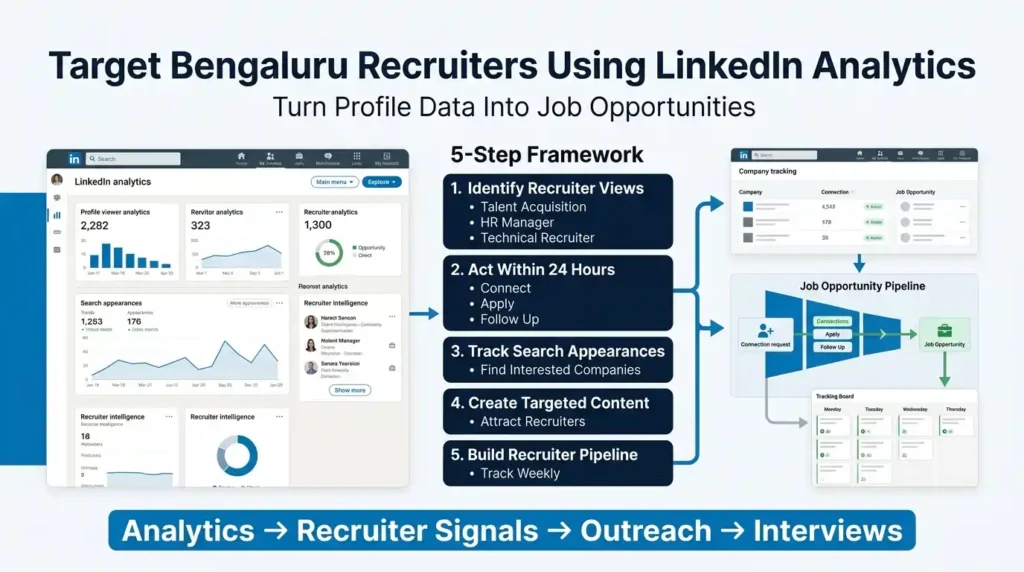
Step 1: Mine Your Profile Viewer Data for Recruiter Signals
Your LinkedIn dashboard shows the job titles and companies of recent profile viewers. Every week, go through this list and specifically identify anyone with the following titles who viewed your profile:
- Talent Acquisition, Recruiter, HR Manager, HR Business Partner, Hiring Manager
- Technical Recruiter, Engineering Manager, Product Head, CTO (for senior roles)
- Anyone from a staffing firm or executive search agency based in Bengaluru
These are warm leads. They viewed your profile for a reason – and that reason is almost always because something in your background matches what they are currently looking for.
Step 2: Act on Recruiter Views Within 24 Hours
When a recruiter views your profile views analytics and you can identify them – act immediately:
- If you can see their name – send a connection request with a specific note: ‘I noticed you viewed my profile – I am currently exploring [role type] opportunities in Bengaluru and would welcome a conversation if there is a fit.’
- If you can only see their company – go to that company’s LinkedIn page, find the HR or talent team, and connect with the recruiter most likely to have viewed your profile based on their role and specialisation
- Apply to any open roles at their company – if the company has relevant openings, apply within 24 hours. A recruiter who just viewed your profile reviewing your formal application is a very strong signal
Step 3: Use Search Appearances to Find Companies Actively Looking for Your Profile
Your LinkedIn search appearances section shows which companies their employees work at when they search for you. This is company-level recruiter intelligence. Here is how to use it:
- Make a list of every company that appears in your search appearances data over 3 to 4 weeks
- Cross-reference this list with LinkedIn Jobs to check for relevant open roles at those companies
- Connect with the HR or talent acquisition team at each of those companies – these companies have already self-identified as searching for profiles like yours
- Follow each of those companies on LinkedIn and enable job alerts – so you are always first to apply when they post a new role
Step 4: Create Content That Attracts Specific Bengaluru Recruiters
Once you know which companies’ employees are finding you in search – you can create content specifically designed to attract more people from those companies. If your LinkedIn data insights show that employees from Bengaluru’s top product companies are finding you – post content about product management, product-led growth, or B2B SaaS topics that those companies care about. This creates a content signal that reinforces your keyword signal, and the compounding effect dramatically increases both your LinkedIn search appearances from those companies and your profile views analytics from their recruiting teams.
Step 5: Build a Bengaluru Recruiter Target List and Track It Weekly
Using your analytics data, build a simple Bengaluru recruiter target list – the 10 to 15 specific recruiters or HR professionals at your top target companies. Each week, check whether any of them have viewed your profile, engaged with your content, or accepted your connection request. This converts your passive LinkedIn analytics job search Bengaluru data into an active, managed recruiter relationship pipeline.
Ready to Supercharge Your Bengaluru Job Search With the Right LinkedIn Tools?
You have done the hard thinking.
You now know exactly how to use LinkedIn analytics job search Bengaluru professionals rely on – from reading your LinkedIn dashboard to interpreting LinkedIn search appearances, tracking profile views analytics, and converting data signals into real job opportunities. The only question left is: do you have the right premium tools to execute at the highest level?
At PremiumToolsHub, we have helped 650+ professionals, freelancers, and agencies across 15+ countries access the exact same premium tools they were already using – just at prices that finally make sense. Here is what you get when you work with us:
- Proper billing invoice with every purchase – every transaction is clean, documented, and professional.
- Real human support on WhatsApp, 9 AM to 12 AM IST – no bots, no ticket queues. A real person answers – usually within a few hours.
- 100% legitimate access through proper licensing – official family plans, team workspaces, and authorized reseller programs. No cracked software. No risk.
- Way more than just LinkedIn Premium – AI tools, design tools, productivity suites, and more – all in one place.
Visit premiumtoolshub.in or send a message on WhatsApp to see exactly how much you could be saving – starting from your very next billing cycle.
FAQ – People Also Ask
1. What do LinkedIn analytics tell me?
LinkedIn analytics tell you three critical things for your job search: how many times your profile appeared in search results (LinkedIn search appearances), how many people viewed your full profile and what industries and companies they come from (profile views analytics), and how your posts and content are performing in terms of reach and engagement. Together, these LinkedIn data insights give you a real-time picture of how visible and attractive your profile is to Bengaluru recruiters and hiring managers – and exactly where you need to improve.
2. How to increase LinkedIn profile views in Bengaluru?
To increase LinkedIn profile views in Bengaluru, focus on four actions: rewrite your headline with specific keywords from Bengaluru job descriptions in your target role, post content 2 to 3 times per week to trigger LinkedIn’s algorithm visibility boost, get endorsements for your top skills from connections (endorsed skills rank higher in recruiter searches), and make a meaningful profile update once every 3 to 4 weeks to trigger a notification-based profile views analytics spike. Monitor your LinkedIn dashboard weekly to track whether these actions are moving your numbers upward.
3. What does LinkedIn search appearance mean?
LinkedIn search appearance is the number of times your profile appeared in search results when someone searched LinkedIn during the past week. For LinkedIn analytics job search Bengaluru purposes, this is the most important metric – because LinkedIn search is how recruiters find candidates. A higher LinkedIn search appearances number means more Bengaluru recruiters are seeing your profile in their search results. The section also shows which keywords led to your appearances and which companies the searchers work at – giving you specific intelligence about who is looking for professionals like you.
4. How to use LinkedIn data to find jobs faster?
To use LinkedIn data to find jobs faster in Bengaluru, treat your LinkedIn dashboard as a weekly intelligence briefing. When a company you want to work for views your profile – apply to their open roles within 48 hours. When your LinkedIn search appearances drop – update your keywords immediately. When a post performs unusually well – connect with everyone who engaged with it. When your profile views analytics are high but you are getting no recruiter contact – rewrite your About section and experience entries. Each LinkedIn data insights signal has a specific action attached to it, and acting on those signals consistently is what converts LinkedIn visibility into actual job offers in Bengaluru.
Conclusion: Your LinkedIn Analytics Are the Map – Start Using Them
Let us bring this together. Every Bengaluru professional with a LinkedIn account has access to a live, continuously updating data dashboard that tells them exactly how visible they are to recruiters, which companies are noticing them, how their content is performing, and where the gaps are between their current presence and where they need to be. Most people never look at it.
You now know how to find and read your LinkedIn dashboard, how to interpret profile views analytics and act on the data within 48 hours of seeing it, what LinkedIn search appearances meaning for Bengaluru job seekers actually is and how to increase it, and how to run a weekly data review that takes less than 30 minutes but produces measurable improvements in your visibility every single week.
You have a complete set of LinkedIn analytics tips for improving profile visibility Bengaluru – from the headline rewrite test to the content timing experiment to the strategic profile update that creates a temporary search ranking boost. You understand how to track LinkedIn job search performance India-style with a simple weekly routine, and you know how to use LinkedIn analytics to get more job offers in Bengaluru by treating company profile views as warm leads and acting on them immediately.
Understanding LinkedIn profile views analytics for Bengaluru professionals means knowing that every number in your dashboard is a signal – not just a statistic. High search appearances with low profile views means your headline needs work. High profile views with no recruiter contact means your About section needs rewriting. These are not mysteries – they are problems with clear, data-informed solutions.
And you know how to use LinkedIn analytics to get more job offers in Bengaluru – not by posting more randomly or applying to more jobs blindly, but by reading what your data is telling you each week and responding with specific, targeted actions that move the right metrics in the right direction.
Your LinkedIn analytics job search Bengaluru data is not just numbers. It is a map of exactly where you are visible, who is paying attention, and what you need to do differently to attract more of the right opportunities in Bengaluru’s fast-moving job market. The map has always been there. Now you know how to read it.
Open your LinkedIn dashboard this week. Start with Search Appearances. The data will tell you exactly what to do next.