If you are searching for Canva Pro pricing, you are probably trying to answer one simple question: is Canva Pro really worth paying for, and which plan gives the best value?
Canva is easy to start with because the free version already gives you a lot. But once you begin designing regularly for Instagram posts, YouTube thumbnails, presentations, ads, resumes, business materials, or client work, the limits of the free plan start to show. That is where Canva Pro comes in. Canva describes Pro as its paid plan for individuals who want premium content, advanced design tools, and AI-powered features. Canva also offers different billing options, and its terms say pricing can vary by location and the billing details you provide at checkout.
Many people want to know the Canva Pro cost, the Canva Pro price in India, whether the Canva Pro monthly plan is better than the yearly option, and how to avoid paying more than needed.
This guide is made for that exact purpose.
Here, you will learn what Canva Pro is, how the Canva Pro subscription works, what the monthly and yearly billing options usually mean, how to think about the price in a practical way, who should buy it, who can skip it, and what to know before paying. We will also cover Canva Pro vs free version, Canva Pro team pricing, and the cheapest way to buy Canva Pro safely and legitimately.
The goal of this article is not to push you toward buying. The goal is to help you make the right decision based on your work, your budget, and your actual design needs.
What Is Canva Pro and Why Do People Pay for It?
Canva Pro is the paid version of Canva. Canva itself is a design platform that helps users create social media posts, presentations, banners, resumes, flyers, videos, thumbnails, and many other types of content without needing advanced design skills.
The free version is enough for many casual users. But Canva Pro is designed for people who want more speed, more freedom, and more design tools in one place.
People usually pay for Canva Pro because they want access to premium templates, premium photos, background remover, brand kit tools, resize options, extra storage, and smoother workflow features. These things save time. For many users, that time-saving is the real reason behind the price.
For many users, the question is not “Can I use Canva for free?” Yes, you can. The better question is “Will the free version slow me down once I start using Canva seriously?” For casual use, Free may be enough. For regular content work, Pro often feels smoother.
What does Canva Pro include?
The paid plan is known for offering more design assets and useful features that help users work faster. Instead of searching for free elements again and again, Canva Pro users can get more ready-made assets in one account. This is especially useful for creators, freelancers, marketers, and business owners who create content often.
For example, if you make Instagram posts every day, client presentations every week, and marketing banners every month, the free version can start feeling limited. Canva Pro helps reduce that friction.
Why Canva Free is not enough for some users
Canva Free is good for basic designs. But once your work becomes more serious, you may start needing better templates, premium stock media, stronger branding tools, and faster editing options.
This is where many users start searching for Canva Pro pricing. They are not always looking for “more features” in a general sense. They want better output in less time. That is why the paid version appeals to working professionals.
Who should use Canva Pro?
Canva Pro is usually more useful for:
- freelancers who create client designs
- social media managers
- small business owners
- YouTubers and content creators
- coaches and consultants
- students creating polished presentations
- marketers running campaigns
- agencies managing many brand assets
If you only make a design once in a while, Canva Free may still be enough. But if design is now part of your daily work, Canva Pro becomes easier to justify.
Also Read – How to Use Canva Pro for Social Media Design- Beginner to Advanced
Canva Pro Pricing at a Glance
When people search for Canva Pro pricing, they usually want a quick and clear answer first. They do not want to read a full guide before understanding the basics.
In simple terms, Canva Pro is usually offered as a paid subscription with two common billing styles:
- Canva Pro monthly plan
- Canva Pro annual plan
This means you can often choose to pay month by month or pay for a longer period at once. For individual users, the annual option is generally seen as the better value if they plan to use Canva for a long time. The monthly option is more flexible and suits short-term users better.
There is also a business-oriented option that users often search as Canva Pro team pricing. This is for teams that need shared brand tools, collaborative workflow, and centralized design control.
Canva Pro monthly plan
The monthly version is usually chosen by users who do not want a long commitment. This is helpful if you only need Canva for a campaign, a job search, a product launch, or a limited client project.
Canva Pro annual plan
The yearly version is usually chosen by people who already know they will keep using Canva for months. It often feels more economical over time because paying for a full year tends to reduce the average monthly cost.
Canva Pro subscription options
So when users ask about Canva Pro subscription, they are usually asking one of these things:
- Can I pay monthly?
- Can I pay yearly?
- Is yearly cheaper than monthly?
- Which plan is best for one person?
- Is there a plan for teams?
This guide answers all of those.
How Much Does Canva Pro Cost in India?
One of the most common searches is Canva Pro price in India or how much does Canva Pro cost in India. This is a very practical question because users in India often compare software pricing carefully before subscribing.
The important thing to understand is that pricing can vary over time due to billing changes, taxes, currency adjustments, local offers, and platform-specific billing. So instead of depending on an outdated number from random websites, users should always check the current official pricing before making a final payment decision.
Still, the search intent behind this question is very clear: Indian users want to know whether Canva Pro feels affordable, whether annual billing saves money, and whether there are any better purchase options.
Canva Pro price in India for monthly users
The Canva Pro monthly plan is usually best for users who want flexibility. In India, many users choose this when they need the tool for:
- festival campaigns
- exam projects
- business launch materials
- wedding invitations
- freelance client work
- temporary content creation needs
If you are unsure whether you will use Canva every month, monthly billing can feel safer. You pay more over time compared to yearly billing, but you avoid a bigger upfront payment.
Canva Pro price in India for yearly users
The Canva Pro annual plan is generally the better option for users who create content regularly. If you run a business page, manage multiple clients, or need design tools every week, the annual version often gives better overall value.
This is why many users searching for Canva Pro cost are not really asking only about the sticker price. They are asking about long-term value. A plan may look expensive at first, but if it saves hours every month, it may still be the better deal.
Taxes, currency, and billing points Indian users should know
For Indian buyers, final payment may depend on:
- local tax inclusion
- billing platform
- payment method
- whether the plan is billed in INR or adjusted from another currency
That is why it is always smart to review the billing page carefully before payment. When users ask where to check pricing, the safest answer is the official Canva billing page or official app store listing, depending on how they want to subscribe.
Also Read – How to Use Figma for UI Design
Canva Pro Monthly Plan vs Annual Plan: Which One Is Better?
A big part of Canva Pro pricing is choosing between the monthly and yearly options. The better plan depends on how often you will use Canva and why you need it.
What do you get in the monthly plan?
The monthly plan is mostly about flexibility. It helps when you want full Pro features without a long commitment. This works well for short projects, seasonal work, internships, event planning, or one-time campaigns.
If you are testing Canva Pro for the first time, monthly billing can help you understand whether the features actually fit your workflow.
What do you get in the annual plan?
The annual plan is usually for serious or regular users. It suits people who create social media posts, sales designs, pitch decks, ad creatives, thumbnails, and client graphics on a regular basis.
It is also easier for people who do not want the hassle of month-to-month renewals.
Which plan is cheaper in the long run?
In most cases, the Canva Pro annual plan is the cheaper option when you look at total value over time. The yearly plan often reduces the effective monthly cost compared to paying every single month.
So if your question is which Canva plan is better, the answer depends on your time frame:
- choose monthly if you need flexibility
- choose annual if you want better long-term value
Who should choose monthly billing?
The monthly plan is better for:
- short-term users
- students working on limited projects
- people testing Canva Pro
- seasonal business campaigns
- one-time design needs
Who should choose annual billing?
The annual plan is better for:
- business owners
- freelancers
- agencies
- social media managers
- content creators
- people who use Canva every month
This is one of the strongest commercial-intent parts of the topic because users want a direct answer, not general advice.
Canva Pro Cost Breakdown: Is It Worth the Price?
A lot of users search Canva Pro Cost because they do not want just the price. They want to know whether the price feels fair.
The easiest way to judge this is not by looking only at the monthly amount. Look at the value you get from time saved.
Imagine a freelancer who creates Instagram posts, stories, pitch decks, proposal PDFs, thumbnails, and client banners every week. If Canva Pro helps that person save even a few hours each month through faster templates, premium assets, and easier resizing, the subscription can pay for itself quickly.
The same logic works for small businesses. If Canva Pro helps a business create better-looking content without hiring a designer for every simple task, the value can be much bigger than the subscription amount.
Cost per month if you use Canva daily
If you use Canva almost every day, the paid plan often feels more justified. Regular users save time on:
- finding premium templates
- editing brand designs
- resizing content
- using ready-made assets
- creating faster content for multiple platforms
For a daily user, the real cost is not just money. It is also the time saved.
Cost per design for freelancers and creators
Freelancers often think about software cost in terms of output. If one tool helps you make client work faster, then even one project can help recover the subscription cost. This is why many freelancers search cheapest way to buy Canva Pro, but still end up choosing official billing because the work value is higher than the subscription cost.
When Canva Pro feels expensive
Canva Pro may feel expensive when:
- you use it rarely
- you only need basic templates
- you do not use premium features
- you already use other design tools
- you only create simple posts occasionally
When Canva Pro becomes worth it
Canva Pro becomes easier to justify when:
- design is part of your weekly work
- speed matters
- consistency matters
- you manage a brand
- you create content across many formats
- you need premium assets regularly
So, why do people pay for it? Because for the right user, it removes small daily problems that waste time.
Also Read – How to Use CorelDRAW for Illustration
Canva Pro vs Free Version: What Is the Real Difference?
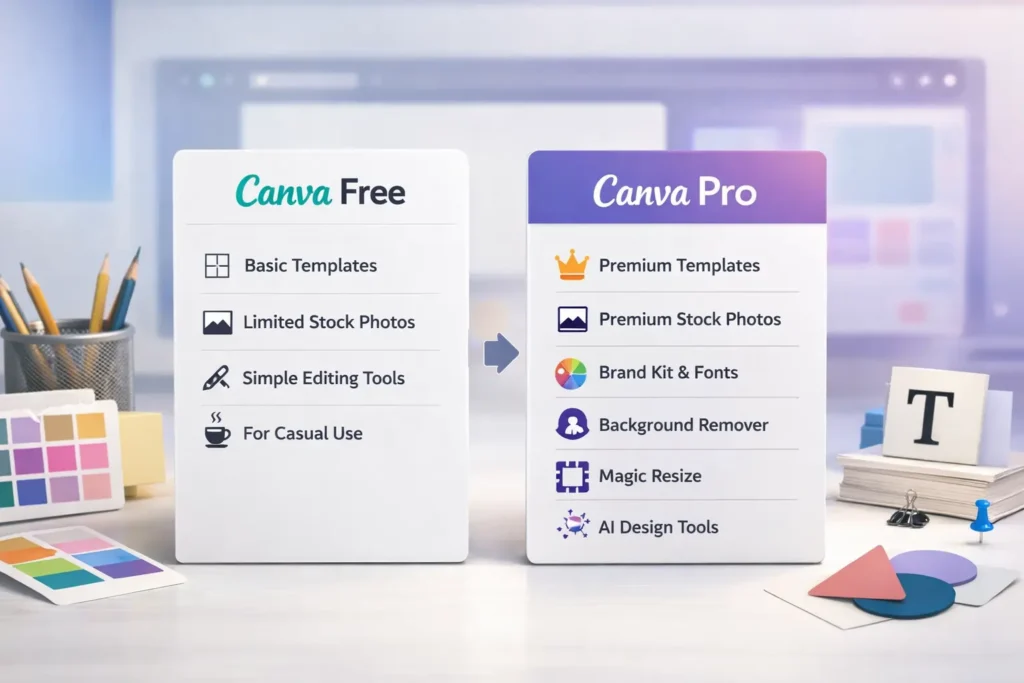
This is one of the biggest search intents around Canva. People do not just want price. They want a real answer to canva pro vs free version.
Canva says the free plan is meant to help individuals create and explore with free templates and content. Pro unlocks advanced features like Background Remover, Brand Kit, Magic Resize, premium content, and many AI-powered tools. Canva also states that Pro gives access to a much larger premium library.
In real life, the difference is simple: Canva Free helps you design. Canva Pro helps you design faster, more consistently, and with fewer limits.
Features available in Canva Free
Canva Free gives access to a lot more than many people expect. You can still create social posts, use many templates, edit images, add text, and build basic designs without spending money.
That is why the free plan remains a good starting point.
Features only available in Canva Pro
Canva Pro is more attractive when users need:
- premium templates
- premium stock photos and graphics
- background remover
- brand kits
- one-click resize tools
- more organized workflow
- stronger design consistency
These features matter more when you create designs often or manage professional work.
Design workflow differences
The biggest difference is not only the number of assets. It is the workflow.
With Canva Free, you may spend more time adjusting, searching, and finding workarounds. With Canva Pro, the design process usually feels smoother. That is a big reason users upgrade.
Which users can stay on Canva Free?
Canva Free is enough for:
- casual users
- school projects
- occasional posters
- simple presentations
- people testing the platform
Which users should upgrade to Canva Pro?
Canva Pro is better for:
- creators posting often
- businesses needing branding
- professionals creating client work
- teams wanting consistency
- users needing faster turnaround
So if you are wondering what the real difference is, the answer is this: Canva Free helps you design, but Canva Pro helps you design faster and with fewer limits.
Canva Pro vs Free version table
| Feature area | Canva Free | Canva Pro |
| Basic templates | Yes | Yes |
| Premium templates | Limited / no full access | Yes |
| Premium stock assets | Limited | Yes |
| Brand Kit | No / limited | Yes |
| Background Remover | No | Yes |
| Magic Resize | No | Yes |
| AI-powered features | Limited | More access |
| Best for | Casual users | Regular creators |
So, if someone asks which is better, Canva Free or Canva Pro? the fair answer is this: Free is better for light use, while Pro is better for serious and frequent use.
Also Read – Canva vs Visme – Best for Business Graphics?
Canva Pro Team Pricing: How It Works for Teams and Businesses
Many people search canva pro team pricing, but this area can confuse users because Canva has moved more clearly toward business and team-based positioning for collaboration features.
Canva says team-style plans work with a pay-as-you-grow model. That means you are charged based on the team members who accept invitations. Canva also says billing is adjusted monthly, or quarterly if you are on an annual subscription, for team-style business use.
This is important because team pricing is not the same as solo Canva Pro pricing.
Team vs solo decision guide
| Need | Better choice |
| One-person use | Canva Pro |
| Two or more active creators | Team/business plan |
| Brand consistency across staff | Team/business plan |
| Client work by one freelancer | Canva Pro |
| Shared workspace and admin control | Team/business plan |
Also Read – Canva vs Piktochart – Which is Best for Infographics?
What is Canva Teams?
Canva Teams is meant for collaborative work. It is designed for groups that want shared access, brand control, team templates, and smoother design approval workflows.
How team pricing is different from individual pricing
An individual Canva Pro subscription is usually best for one person. But teams need features built around collaboration. That is where team plans become useful.
If one person creates designs for everyone, an individual plan may be enough. But if multiple people create, edit, review, and manage brand content, team pricing becomes more logical.
Who should choose Canva Teams instead of Canva Pro?
Canva Teams may be better for:
- agencies handling multiple client brands
- startups with shared marketing work
- in-house marketing teams
- schools or training institutes
- businesses with more than one content creator
Is Canva Teams worth paying extra for collaboration?
It can be worth it when brand consistency matters. For example, if your business wants every post, pitch deck, and sales design to follow the same style, shared brand tools reduce mistakes and save time.
So when users search which Canva plan is best for teams, the right answer depends on how many people are involved and whether collaboration is a daily need.
Cheapest Way to Buy Canva Pro Legitimately
This is where many users get trapped by unsafe offers. If you search cheapest way to buy Canva Pro or canva pro discount offer, you will often find very low-price sellers online. But very cheap unofficial shared accounts can be risky, unstable, or against Canva’s terms.
The safest low-cost path is not usually a random seller. The safest path is choosing the right official billing method and checking whether you qualify for special access.
Is there any official free trial?
Some users first look for a free trial to test whether Canva Pro fits their workflow. This is often the safest low-risk way to understand the platform before paying.
Are annual plans cheaper than monthly billing?
In most cases, yes. If you already know you will use Canva regularly, the Canva Pro annual plan is usually the more economical route compared to staying on monthly billing for a long period.
Can students, teachers, or nonprofits get better access?
Depending on the platform’s policies, certain categories of users may have access to better educational or nonprofit solutions. This is why users often search for Canva Pro discount offers or local savings options.
Safe ways to save money on Canva Pro
The safest ways usually include:
- checking official billing options
- comparing monthly vs yearly cost
- using any official trial if available
- reviewing education or nonprofit eligibility if relevant
- subscribing only when you actually need it
What to avoid when looking for cheap Canva Pro deals
Avoid suspicious shared logins, unknown resellers, and “lifetime” style offers that look unrealistic. These may seem cheap, but they often create bigger problems later.
So if your query is where can I get Canva Pro cheaper, the best answer is: use official, safe, and transparent options only.
Also Read – Canva vs Figma – Which Is Better for Design Teams?
Where Can You Buy Canva Pro Safely?
The best place to buy Canva Pro safely is through official channels. This matters because software subscriptions involve account security, billing trust, renewal control, and support access.
Buying directly from Canva
This is usually the safest route for most users because you can manage your plan, review renewals, and handle billing from one place.
Buying through app stores or mobile billing
Some users prefer mobile billing because it feels simpler. But they should still compare plan details and renewal control before choosing this route.
Which payment method is best for Indian users?
That depends on user convenience, billing transparency, and renewal comfort. The main thing is to choose a method you can manage easily later.
Why unofficial cheap accounts can be risky
A very cheap deal may look attractive, but if access disappears after a few weeks, the money saved is wasted. For professional users, safety matters more than a fake discount.
Who Should Buy Canva Pro and Who Should Skip It?
Not everyone needs Canva Pro. That is important to say clearly.
Who should buy Canva Pro?
You should seriously consider Canva Pro if you:
- create content every week
- manage social media pages
- work with clients
- need brand consistency
- make presentations often
- sell products online
- use templates and stock assets regularly
Who should skip it?
You may skip Canva Pro if you:
- design rarely
- only need simple graphics
- are happy with free templates
- do not use branding features
- already use another strong design tool
When Canva Free is enough
For many people, Canva Free is still enough. That is why the right buying decision depends on actual usage, not hype. If your design needs are light, save your money.
How to Choose the Right Canva Subscription for Your Needs
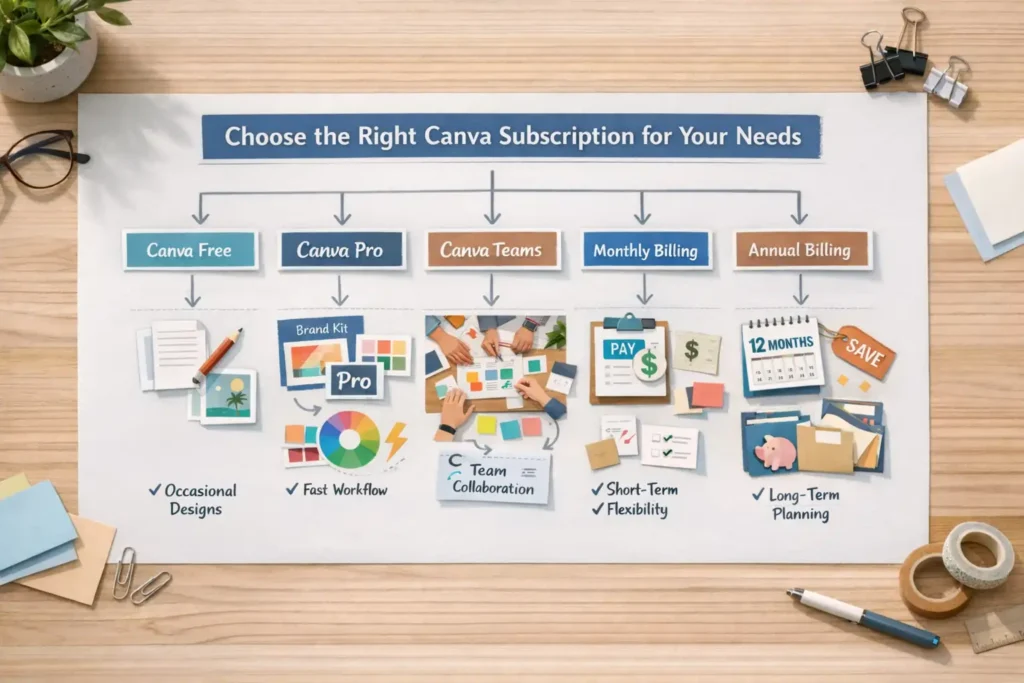
If you are still confused, this simple decision path can help.
Choose Canva Free if…
You only create occasional designs and do not need advanced features.
Choose Canva Pro if…
You work alone but create content regularly and want better speed, better assets, and stronger workflow.
Choose Canva Teams if…
You work with others and need collaboration, shared branding, and controlled design systems.
Choose monthly billing if…
You want flexibility, are testing the platform, or only need it for a short period.
Choose annual billing if…
You already know Canva is part of your regular workflow and you want better long-term value.
This section matters because many users search which Canva subscription should I choose without knowing the exact plan names.
Also Read – Canva vs Adobe Express – Which Design Tool Wins?
Need Canva Pro at a Better Deal?
If you want Canva Pro or other premium tools at a much lower cost, PremiumToolsHub is a trusted option to explore. PremiumToolsHub.in provides premium tools at a huge discounted price with proper payment invoice and full customer support. This makes it a useful choice for users who want premium access with better value and clear purchase support.
Whether you need Canva Pro for content creation, LinkedIn tools for growth, AI tools for work, or other premium subscriptions, PremiumToolsHub.in helps you get the tools you need in a more budget-friendly way. If saving money matters but you still want proper support and billing proof, this platform can be a practical option.
Common Questions About Canva Pro Pricing
1. What is Canva Pro pricing?
Canva Pro pricing refers to the paid subscription cost of Canva’s premium plan for individual users. It usually includes monthly and annual billing options.
2. How much does Canva Pro cost in India?
The Canva Pro price in India can vary based on billing structure, tax, and pricing updates. Users should always check the official pricing page for the latest amount.
3. Is Canva Pro billed monthly or yearly?
It is commonly offered with both billing styles, which is why users compare the Canva Pro monthly plan and Canva Pro annual plan before subscribing.
4. Does Canva Pro have team pricing?
Users looking for multi-user collaboration usually explore Canva Pro team pricing or team-based Canva options built for shared workflow.
5. Is there any Canva Pro discount offer?
People often search for Canva Pro discount offer, but the safest approach is to rely only on official plans, official trial options, and valid eligible programs.
Final Verdict: Is Canva Pro Pricing Worth It in 2026?
Canva Pro pricing makes the most sense for people who create content often and want to save time. If you are a freelancer, business owner, marketer, content creator, or regular Canva user, the paid plan can offer real value. If you only design sometimes, Canva Free may still be enough.
So, which plan is best?
Go for the Canva Pro monthly plan if you want flexibility. Choose the Canva Pro annual plan if you want better long-term value. If you work with others, look into Canva Pro team pricing or team-based collaboration plans.
In the end, the smartest decision is not just about the lowest price. It is about buying the right plan for the way you actually work.