If you are a designer in India trying to build a freelance career in 2026, one tool comes up in every conversation – Figma. Whether you are a 12th pass student exploring design, a working professional switching careers, or a fresh graduate looking to freelance – learning how to use Figma for freelancers India 2026 is the single most important skill you can build right now.
Figma is not just a design software. It is the tool that Indian startups, product companies, and global clients expect when they hire a Figma freelancer India. In 2026, when you send a client a Figma link, they can open it in their browser without installing anything, leave comments directly on your design, and share it with their developer – all in one link. No email attachments. No version confusion. No back-and-forth about which file is the latest.
This guide covers everything – from understanding figma for ui ux designers india 2026, to setting it up, building a portfolio, getting figma freelance projects india, pricing your work, using AI features, and deciding if the figma professional plan india is worth it for you. Whether you are a complete beginner or someone who has used Figma before but has not taken it seriously – this is the guide that takes you from zero to earning.
Let us start.
What Is Figma and Why It Has Become the Standard for Indian UI/UX Freelancers in 2026
Figma is a browser-based design tool that runs entirely online – you do not need to install any software on your laptop or desktop. You open it in Chrome, sign in, and you are designing. This is a big deal in India because many freelancers work on mid-range laptops, and heavy desktop software like Adobe Photoshop often slows things down or requires expensive hardware.
For figma for ui ux designers india 2026, the most important thing to understand is this – Figma is the industry standard. 95% of Fortune 500 companies use Figma globally. In India, every major startup, every digital agency, and most product companies use Figma as their primary design tool. When a client posts a UI/UX project on Upwork, Internshala, or Toptal, they almost always say ‘Figma files preferred’ or ‘must know Figma.’ If you do not know Figma, you are out of the shortlist before the conversation even starts.
Did You Know? Adobe attempted to acquire Figma in 2022 for $20 billion – one of the biggest deals in software history. The deal was blocked by regulators in 2023, and Figma went independent. Figma then went public in July 2025 at a $12.5 billion valuation and crossed $1.1 billion in annualized revenue in early 2026. This is not a niche tool – it is the design industry’s backbone.
Here is why Indian freelancers specifically love Figma:
- No installation needed – works on any laptop with a decent internet connection, which is how most Indian designers work
- Real-time collaboration – clients can view, comment, and give feedback without needing a separate account or software
- Dev Mode – your developer can extract CSS values, spacing, measurements, and assets directly from your Figma file without you having to explain anything separately
- Free to start – the free plan is genuinely useful, which means you can start learning and even take your first projects without spending a rupee
- Huge plugin ecosystem – thousands of free plugins that extend what Figma can do – icons, accessibility checks, stock photos, design tokens, and more
Also Read – What Are the Best Tools for Freelancers to Use in 2026?
Figma Free vs Professional Plan – What Indian Freelancers Actually Need
This is the question every figma for beginners india guide gets wrong – they either say ‘just use free’ or ‘upgrade immediately.’ The honest answer is more nuanced, and it depends on where you are in your freelance journey.
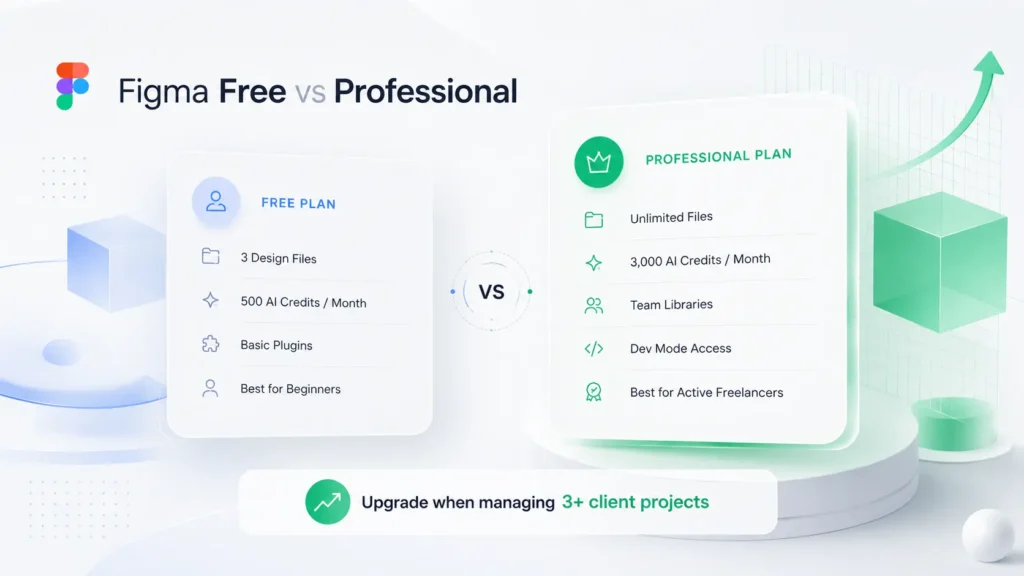
What the Free Plan Covers – and Exactly Where It Breaks for Paid Work
The Figma free Starter plan gives you:
- 3 Figma design files and 3 FigJam boards per team
- Unlimited personal drafts – these do not count against your 3 file limit
- 150 AI credits per day (up to 500 per month)
- Unlimited collaborators with view and comment access – clients can see and comment without paying
- Basic plugin access and community templates
For a beginner taking their first 1 or 2 projects, the free plan works. But here is exactly where it breaks – once you are running 3 or more active client projects simultaneously, you hit the file limit. You then have to archive old projects, which means losing easy access to your own work. You also do not get team libraries, which means every project starts from scratch with no shared components.
Figma Professional Plan India – Features and Honest Verdict
The figma professional plan india removes the 3-file limit completely and adds:
- Unlimited files and projects – run as many client projects as you want simultaneously
- Team libraries – build your own component library once and reuse it across every project
- Unlimited version history – never lose a previous version of any design
- Advanced prototyping – conditional logic, expressions, and multiple actions in your prototypes
- Dev Mode for developers – your clients’ developers can extract code-ready specs without you needing to explain every measurement
- 3,000 AI credits per month – triple the free plan allocation for Figma Make and AI features
Is the figma professional plan worth it for freelancers india? If you are billing clients regularly – yes. The team library feature alone saves you hours per project because you are not rebuilding buttons, cards, and navigation components from scratch every time. And unlimited version history protects you when a client asks to go back to a previous design direction.
The figma professional plan india is available at discounted rates through PremiumToolsHub – making it accessible even when you are just starting out and every rupee matters.
| Feature | Free Plan | Professional Plan |
| Figma design files | 3 files per team | Unlimited |
| Version history | 30 days only | Unlimited |
| Team libraries | Not available | Full access |
| Advanced prototyping | Basic only | Full – conditional logic, expressions |
| Dev Mode for developers | Basic inspection | Full Dev Mode |
| AI credits per month | 500 credits | 3,000 credits |
| Best for | Learning, first 1-2 projects | Active freelancers with 3+ clients |
How to Set Up Figma for Freelance Work – Step by Step for Indian Beginners
This is your figma tutorial for beginners india – the exact steps to go from zero to a working design setup. Follow this in order and you will have a professional Figma workspace ready in under an hour.
Workspace, Frames, and Auto Layout – The Three Things You Must Learn First
Step 1 – Sign up and open Figma in your browser. Go to figma.com and create a free account with your email.
Step 2 – Create your first frame. A frame in Figma is like a page or screen. Press F on your keyboard, then click a preset size from the right panel – iPhone 14 for mobile, Desktop for web. This is where all your design lives.
Step 3 – Learn Auto Layout. This is the most important Figma feature for professional work. Auto Layout lets your design elements automatically resize and reposition when content changes – exactly like a real responsive website or app. Select any element, press Shift + A, and you have Auto Layout. Practice this until it feels natural.
Step 4 – Create components. A component is a reusable design element – a button, a card, a navigation bar. Press Ctrl + Alt + K (Windows) or Cmd + Option + K (Mac) on any element to turn it into a component. Once it is a component, every copy you make stays linked to the original – change the original and all copies update automatically.
Figma Settings and File Naming System Every Indian Freelancer Should Use
Professional file organization saves you hours when clients ask for revisions or you return to a project after weeks.
- Name your files clearly – use this format: [Client Name] – [Project Type] – [Date]. Example: TechStartup Mumbai – Mobile App UI – June 2026
- Use pages inside files – Figma lets you add multiple pages inside one file. Use Page 1 for Wireframes, Page 2 for Final UI, Page 3 for Prototypes, Page 4 for Assets
- Name your layers – always name every frame, group, and component. ‘Frame 47’ tells your client and developer nothing. ‘Dashboard Home – Mobile’ tells them everything
- Set your grid – go to Design panel, add a Grid, and use 8px base grid. Every spacing decision you make should be a multiple of 8 – 8, 16, 24, 32, 40. This makes your designs consistent and developer-friendly
- Use color styles – define your primary, secondary, background, and text colors as Figma color styles at the start of every project. This makes brand consistency automatic across every screen
Best Figma Plugins for Indian UI/UX Designers in 2026
One of the biggest advantages of figma for ui ux designers india 2026 is the plugin ecosystem. These are the best figma plugins for indian ui designers 2026 – all free or freemium, all genuinely useful:
| Plugin Name | What It Does | Best For |
| Iconify | Access to 150,000+ icons from Material, Phosphor, Tabler libraries directly in Figma | Any UI project – saves hours finding icons |
| Unsplash | Add real stock photos to your designs with one click – no copyright issues | Landing pages, app mockups, portfolio projects |
| Stark | Checks color contrast for WCAG accessibility standards, simulates color blindness | Making designs accessible – increasingly required by clients |
| Content Reel | Fill your designs with realistic placeholder names, emails, avatars, and cities | Making mockups look real for client presentations |
| Autoflow | Draw user flow arrows between frames automatically | Documenting user journeys and app flows for clients |
| Tokens Studio | Manage design tokens – colors, spacing, typography – that sync with developer code | Design system projects and long-term client retainers |
| UXPilot | AI-powered screen generation – describe a screen and it generates a wireframe | Fast first drafts and client concept presentations |
| Breakpoints | Preview how your design looks at different screen widths in Figma | Responsive web design projects |
For Indian designers specifically – the Iconify plugin is essential because it includes Material Design Icons, which is the standard icon set for Android apps. Since India is an Android-dominated market, most Indian app UI projects follow Material Design guidelines.
Did You Know? India has over 700 million smartphone users, and more than 95% of those phones run Android. This means most Indian app UI/UX projects follow Google’s Material Design 3 guidelines. If you are doing figma for mobile app design india, learning Material Design 3 principles alongside Figma is the fastest way to produce work that Indian clients recognize as professional.
Also Read – Best Graphic Design Tools in 2026: The Complete Guide for Every Designer
How to Design for Mobile Apps in Figma – Complete Beginner Guide for India
Mobile app design is the highest-demand category for figma freelance projects india in 2026. Most Indian startups, local businesses, and consumer apps need mobile-first design. Here is how to approach it:
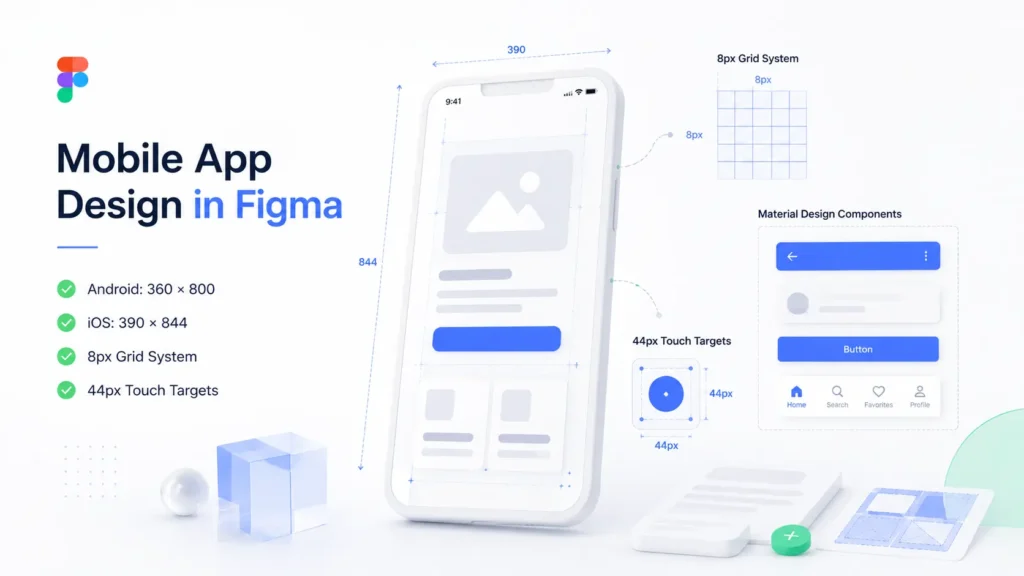
- Start with the right frame size – for Android (most common in India): use 360 x 800px as your base frame. For iOS: use 390 x 844px (iPhone 14 Pro). Design at 1x and export at 2x or 3x
- Use 8px spacing grid – all padding, margins, and gaps should be multiples of 8. This keeps your design consistent and makes developer handoff clean
- Design for thumb reach – all tappable elements should be minimum 44px tall. Navigation bars, buttons, and menu items that are smaller than this are hard to tap on real phones
- Use Google’s Material Design 3 kit – this free Figma community kit gives you pre-built components (buttons, cards, dialogs, navigation bars) that follow Material Design 3. Using this kit for Android app design projects makes your work immediately recognizable as professional to Indian clients
- Design all app states – for every screen, design the empty state (no data), loading state, error state, and success state. Clients and developers appreciate this because it shows you have thought through the real user experience, not just the happy path
- Prototype key flows – connect your screens using Figma’s prototype panel. Link buttons to the correct screens. This lets clients click through your design like a real app, which dramatically increases approval rates and reduces revision cycles
For figma for mobile app design india beginners guide, the one mistake to avoid is designing only for perfect conditions. Indian users have varying phone sizes, slower internet connections, and use apps in different languages. Keep your layouts simple, your text readable at small sizes, and your key actions easy to find.
How to Use Figma AI Features as an Indian Freelancer in 2026
This is the section most figma tutorial for beginners india guides are missing in 2026 – and it is becoming one of the most important things to understand. Figma has introduced serious AI capabilities that change how fast you can work.
- Figma Make – this is Figma’s AI feature that generates working UI from a text prompt. You describe what you want – ‘a fintech app dashboard with account balance, recent transactions, and a send money button’ – and Figma Make generates a starting design. You then refine it. For Indian freelancers, this dramatically reduces the time it takes to create a first concept for a client
- AI layout generation – Figma’s AI can suggest layout options for a given content structure. Useful when you are stuck on how to arrange elements on a screen
- AI-assisted prototyping – Figma can now suggest interaction patterns for your prototypes based on the type of element you are working with
- AI credits on the free plan – even on the free plan, you get 150 AI credits per day (500 per month). On the Professional plan, you get 3,000 credits per month
The important thing to understand about how to use Figma for freelancers India 2026 with AI is this – AI features help you work faster on initial concepts and exploration, but the final quality still comes from your design judgment. Clients are paying for your thinking, your decisions, and your attention to user experience – not just the screen output. Use Figma AI to speed up your workflow, not to replace your design process.
How to Handle Developer Handoff in Figma – for Indian Freelancers Working with Local Dev Teams
Developer handoff is the part of the freelance workflow that most figma tutorial india content ignores – and it is often where client relationships go well or badly. When you finish a design, the developer needs to know exact measurements, colors, fonts, spacing, and assets. If your file is messy, this becomes a back-and-forth that wastes everyone’s time.
Here is how to deliver a clean, professional handoff that Indian developers appreciate:
- Use Dev Mode – Figma Professional’s Dev Mode gives developers a dedicated view of your file where they can click on any element and see its CSS values, spacing, colors, and exportable assets. When you share your file with a developer, share a Dev Mode link instead of a regular editor link
- Name every layer properly – Indian development teams working on React, Flutter, or Android apps need your component and layer names to match their code naming conventions. Name layers in English, use clear descriptive names, and avoid ‘Frame 47’ or ‘Group 12’
- Export assets at correct sizes – for Android: export icons at 1x, 2x, 3x. For iOS: export at @1x, @2x, @3x. Use Figma’s Export panel (right panel, bottom) to set this up on each asset
- Mark measurements and spacing – use the Measure or Redline plugin to annotate your designs with exact pixel values for padding, margins, and component sizes. Indian developers working under tight deadlines especially appreciate this
- Organize by screen – put all screens for a feature on one page, in a logical order (left to right, top to bottom, following the user flow). A developer should be able to read your Figma file like a storyboard
- Prepare a component guide – on a separate page, list all your components with their states (default, hover, active, disabled, error). This single page prevents 80% of developer questions
Also Read – Adobe Creative Cloud Pricing Guide: Plans, Costs, and Best Value in India
How to Set Your Freelance Pricing as a Figma Designer in India
Pricing is where most Indian figma freelancer india careers stall – not because of lack of skill, but because of lack of clarity on what to charge. Here is the honest market picture for figma freelance projects india in 2026:
| Experience Level | Hourly Rate (INR) | Per Project (INR) | Best Platforms |
| Beginner (0-1 year, portfolio only) | Rs. 300-800/hr | Rs. 3,000-8,000 per project | Internshala, Fiverr, local referrals |
| Junior (1-2 years, 5+ projects done) | Rs. 800-1,500/hr | Rs. 10,000-35,000 per project | Upwork, LinkedIn, direct clients |
| Mid-level (2-4 years, strong portfolio) | Rs. 1,500-2,500/hr | Rs. 35,000-80,000 per project | Upwork, direct clients, agencies |
| Senior (4+ years, specialized niche) | Rs. 2,500-4,000+/hr | Rs. 80,000-2,00,000+ per project | Direct international clients, retainers |
Some practical pricing rules for Indian Figma freelancers:
- Never price by screen count alone – a client might say ‘I need 10 screens.’ But 10 screens of a complex fintech app takes 3x longer than 10 screens of a simple landing page. Price by complexity and scope, not just screen count
- Add a revision policy – state clearly in your agreement that 2 rounds of revisions are included, and additional revisions are charged at your hourly rate. This single policy prevents scope creep, which is the number one problem in Indian freelance design projects
- Charge a 40-50% advance – always take payment upfront before starting work. This is standard practice globally and protects you from clients who disappear after receiving work
- Quote in INR for Indian clients, USD for international – for Upwork international projects, quoting in USD at a rate that reflects quality (not rock-bottom pricing) positions you as a professional, not a commodity
How to Build a UI/UX Portfolio in Figma That Gets You Clients in India
Your Figma portfolio is the most important asset in your freelance career. For how to create ui ux portfolio in figma india 2026, here is what actually works – not just what looks good.
- 3 to 5 case studies, not a gallery of screens – Indian and international clients do not want to see 50 beautiful screens. They want to understand how you think. For each project, show the problem, your process (wireframes, user flows, iterations), and the final design
- Use Figma Community to publish your portfolio – Figma Community lets you publish your files publicly. This is a powerful figma portfolio india strategy because clients searching for Indian designers on Figma Community can discover you organically
- Include real client projects if possible – even one real project with a client name (with permission) is worth more than five made-up projects
- Create a portfolio presentation file – design a dedicated Figma file that works as your portfolio deck. Use Figma’s presentation mode to walk clients through your work during calls
- Show before and after – if you redesigned something, show the old version and the new version side by side. This instantly communicates the value you created
- Add device mockups – use the Mockuuups Studio or similar Figma plugin to show your UI inside a real phone or laptop mockup. This small step makes portfolio screenshots look dramatically more professional
- Include your process, not just the output – show your wireframes, your early sketches, your iterations. Clients hiring a figma ui ux design india freelancer want to see that you solve problems, not just make things pretty
How to Get UI/UX Clients in India Using Figma – Platforms, Outreach, and Cold DM Strategy
Having a great portfolio is step one. Knowing how to get clients as figma designer india 2026 is step two – and most designers skip it entirely, then wonder why they are not getting work.
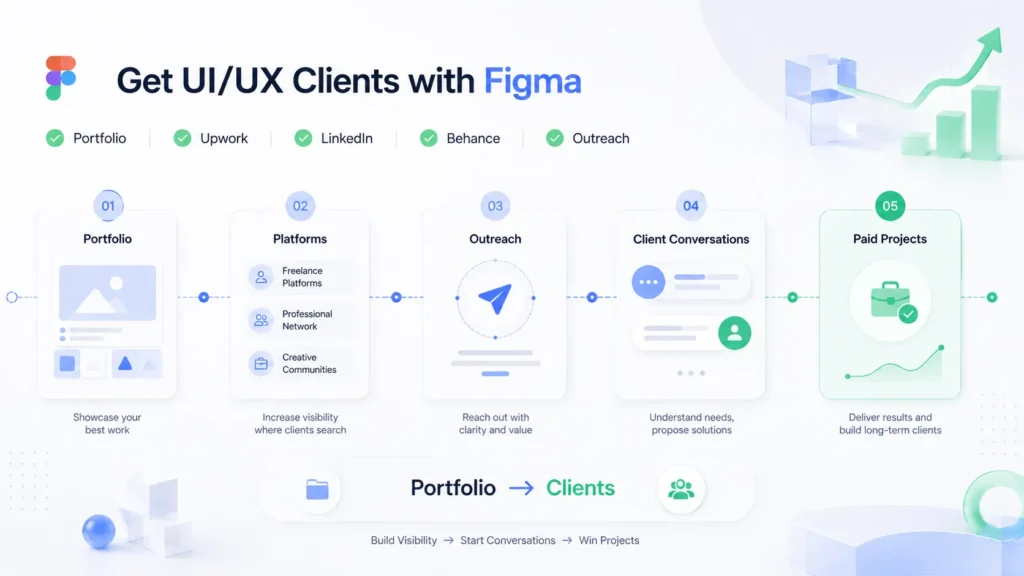
Best Platforms for Figma Freelance Projects India
- Upwork – the largest global freelance platform. Indian UI/UX designers with strong portfolios and verified Figma skills regularly get figma freelance projects india from US, UK, and Australian clients. Build a strong profile, take the Figma skill assessment, and apply to 5-10 projects daily when starting out
- Internshala – excellent for beginners and recent graduates. Many Indian startups and SMEs post UI/UX design projects here at beginner-friendly budgets. Good starting point for your first real client projects
- LinkedIn – the most underused platform by Indian designers. Post your Figma work weekly, write short posts about UI/UX decisions you made on recent projects, and connect with startup founders, product managers, and marketing heads at Indian companies
- Behance – while not a freelance platform directly, a strong Behance profile with your Figma projects gets you inbound inquiries. Tag your work with ‘UI UX India’, ‘Figma designer India’, and relevant industry tags
- Direct outreach – find Indian startups whose app or website has obvious UX problems. Send a short, personalized message: ‘I noticed three specific issues in your app that might be hurting conversions – I redesigned one screen to show what I mean. Can I share it?’ This approach gets responses because it leads with value
For cold DM strategy specifically – keep it short, specific, and value-first. ‘I am a UI/UX designer, hire me’ gets ignored. ‘I noticed your checkout flow has this specific problem and here is how I would fix it’ gets read.
Also Read – Canva vs Adobe: Which Design Tool Is Better for Beginners, Freelancers, and Businesses in 2026?
How to Build a Figma Design System and Turn It Into Retainer Income
This is the income strategy that most figma for ui ux designers india 2026 guides never mention – and it is one of the most powerful ways to build stable freelance income in India. A design system is a library of reusable components, colors, fonts, icons, and patterns that a company uses across all their products. Building one for a client is a high-value project, but maintaining it is recurring income.
Here is how it works:
- Pitch a design system audit first – approach a client with an existing app or website. Tell them their current design is inconsistent – different button styles across screens, colors that do not match, spacing that varies randomly. Offer a design system audit for a fixed fee
- Build the design system in Figma – create a Figma library with all their core components: buttons in all states, input fields, cards, navigation bars, typography styles, color styles, icon sets, and spacing guidelines. This is a project that typically takes 2-4 weeks and commands a significant fee
- Offer a monthly retainer for maintenance – after building the system, propose a monthly retainer to maintain and update it as the client’s product evolves. New features need new components. New brand guidelines need system updates. A monthly retainer of Rs. 10,000 to Rs. 25,000 for design system maintenance is a realistic target for mid-level designers
- Document everything in FigJam – use Figma’s built-in whiteboard tool, FigJam, to document how the design system works, what rules govern component usage, and how new components should be created. This documentation makes you indispensable to the client
The design system retainer model is how experienced figma freelancer india professionals build predictable monthly income instead of constantly chasing new projects.
Figma vs Adobe XD for Indian Freelancers – Which One Wins in 2026?
This is one of the most searched questions by Indian design beginners – figma vs adobe xd india 2026. The honest answer in 2026 is not really a competition anymore. Here is why:
| Criteria | Figma | Adobe XD |
| Active development | Yes – regular major updates in 2025-2026 | No – Adobe XD is in maintenance mode, no new features |
| Collaboration | Best in class – real-time, browser-based | Limited – requires file sharing |
| Indian client expectations | Almost always required by clients | Rarely requested in 2026 |
| Plugin ecosystem | Thousands of active plugins | Plugin community has slowed significantly |
| Developer handoff | Dev Mode – industry standard | Share for development link – functional but outdated |
| AI features | Figma Make, AI layout, AI credits built-in | No significant AI features |
| Price | Free plan available, Professional plan paid | Requires Adobe Creative Cloud subscription |
| Verdict for India 2026 | Learn this first, use this for all client work | Only if client specifically requests it |
For figma vs adobe xd india 2026 – the decision for any Indian freelancer starting today is clear: learn Figma. Adobe XD is technically still functional, but it is not receiving new features or serious investment from Adobe. Starting a design career on Adobe XD in 2026 is like starting a design career on a tool that is slowly being turned off. Every client who knows their tools will ask for Figma. Every developer you work with will expect Figma files.
Did You Know? Adobe XD’s plugin community activity dropped significantly after Adobe shifted focus to other tools in its Creative Cloud suite. In contrast, Figma’s plugin community has over 1,000 active plugins in 2026 across categories like accessibility, AI, prototyping, developer handoff, and design systems. For Indian designers doing figma ui ux design india work, the plugin difference alone makes Figma the only serious choice.
Is Figma Enough to Build a Full-Time Freelance Career in India – Honest Answer
The direct answer is yes – but with one important condition. Figma is the tool. Your freelance career is built on what you do with it.
Here is the realistic picture for how to use figma for freelancers india 2026 as a career path:
- Year 1 – Building You learn Figma, build a portfolio of 3-5 projects (practice or real clients), take your first small paid projects, and establish your presence on Upwork or LinkedIn. Income: Rs. 5,000 to Rs. 30,000 per month depending on consistency
- Year 2 – Growing You have real client projects, a stronger portfolio, and a better understanding of what clients need. You start specializing – mobile apps, SaaS dashboards, e-commerce, or fintech. Income: Rs. 30,000 to Rs. 80,000+ per month
- Year 3 and beyond – Scaling You have direct international clients, long-term retainers, and possibly a small subcontracting network. Some Indian designers at this stage earn Rs. 1.5 lakh to Rs. 3 lakh+ per month through direct client relationships and design system retainers
The designers who do not succeed with figma for ui ux designers india 2026 as a career are almost always the ones who learn the tool but never put their work in front of clients. The tool is not the barrier. Consistency in outreach and portfolio building is the barrier.
Ready to Access Figma Professional Without Paying Full Price – Start Here
You have done the hard work.
You now know exactly how to use Figma for freelancers India 2026 – from setting up your first workspace to building a portfolio, getting clients, handling developer handoff, using AI features, and scaling your income with design system retainers. The only question left is – do you have the right tools at the right price to make it all work?
At PremiumToolsHub, we have helped 650+ agencies, freelancers, and startups across 15+ countries access the exact same premium tools they were already using – just at prices that finally make sense. Here is what you get when you work with us:
- Proper billing invoice with every purchase – every transaction is clean, documented, and professional. You get a proper invoice with each purchase so your freelance books are always in order, with zero ambiguity about what you paid and what you received.
- Real human support on WhatsApp, 9 AM to 12 AM IST – no bots, no ticket queues, no waiting three days for an email reply. A real person answers your WhatsApp message and resolves your issue – usually within a few hours, sometimes within minutes.
- 100% legitimate access through proper licensing – all tool access is provisioned through official family plans, team workspaces, corporate licensing tiers, and authorized reseller programs. No cracked software. No stolen accounts. No risk to your freelance reputation or client relationships.
- Way more than just Figma – PremiumToolsHub gives you access to a full range of premium tools across AI and productivity, design and creative, business and career, and learning – all in one place, all backed by the same warranty and support.
Visit premiumtoolshub.in or send a message on WhatsApp to see exactly how much you could be saving – starting from your very next billing cycle.
FAQ – People Also Ask
Is Figma free enough for freelancers in India?
For beginners and those taking their first 1-2 client projects, the Figma free plan is enough. It gives you 3 files, unlimited personal drafts, 150 AI credits per day, and unlimited view-only collaborators. Where the free plan breaks down is when you are running 3 or more active client projects simultaneously – you hit the file limit and have to archive projects to make space. The figma professional plan india removes all file limits and adds team libraries, unlimited version history, and full Dev Mode. It is worth upgrading once you are earning consistently from Figma work.
What is the difference between Figma Free and Professional plan?
The key differences are: file limits (3 files free vs unlimited on Professional), version history (30 days free vs unlimited on Professional), team libraries (not available on free, full access on Professional), advanced prototyping (basic on free, full conditional logic on Professional), and AI credits (500/month free vs 3,000/month Professional). For how to use figma for freelancers india 2026, the Professional plan is the right choice once you have more than 2 active clients at any time.
How to get UI/UX clients using a Figma portfolio in India?
The most effective approaches are: publish your Figma portfolio files on Figma Community so clients can discover you; create a strong Upwork profile with your Figma skill assessment completed; post your UI/UX work regularly on LinkedIn with brief explanations of your design decisions; and send personalized outreach to Indian startups identifying specific UX problems in their existing products and offering a redesign concept. For figma freelance projects india, consistency in outreach matters more than perfection in portfolio. Most Indian designers who succeed get their first serious clients through LinkedIn or direct referrals, not passive platforms.
Is Figma better than Adobe XD for Indian freelancers?
Yes – clearly, in 2026. Adobe XD is no longer receiving new features and is effectively in maintenance mode. Figma is actively developed with regular updates, has a much larger plugin ecosystem, has better developer handoff through Dev Mode, and is what the overwhelming majority of Indian clients and international clients expect. For figma vs adobe xd india 2026, any Indian designer starting today should invest all their learning time in Figma. Adobe XD knowledge does not transfer to new client opportunities the way Figma skills do.
Conclusion – Your Figma Freelance Roadmap for India in 2026
Let us bring this together. How to use Figma for freelancers India 2026 is not one skill – it is a stack of connected skills that build on each other. You start with the basics – frames, auto layout, components. You add the professional layer – proper file organization, design system thinking, clean developer handoff. You build your income layer – portfolio, client outreach, pricing strategy, and eventually retainer relationships.
You now know that the figma professional plan india is worth it once you are running multiple active projects. You know the best figma plugins for indian ui designers 2026 that save hours on every project. You know how figma for mobile app design india works in the Android-dominated Indian market. You know why figma vs adobe xd india 2026 is not really a debate – Figma wins, clearly. And you know the design system retainer model that turns one-time projects into stable monthly income.
The figma for ui ux designers india 2026 opportunity is real. Indian startups are building products. Indian companies are investing in design. International clients on Upwork are actively looking for skilled figma freelancer india talent. The market is there.
Start with Figma today. Build something real. Put it in front of a client. That is how every successful Indian UI/UX freelance career begins. Yours can too.